


Imagine yourself working on a crucial task when all of a sudden, the warning message Kernel Data Inpage Error appears on your screen and it flashes blue. It is comparable to a car engine crashing in the middle of the highway, leaving users unexpectedly stranded. This problem, which is frequently connected to corrupted system files or hardware issues, can be frustrating and even lead to data loss. However, a properly maintained system can effectively prevent and fix this error, much like a well-tuned engine.
Fundamentally, the Kernel Data Inpage Error (stop code 0x0000007A) arises when Windows is unable to retrieve the required data into memory from the paging file. Hard drive failures, malfunctioning RAM, out-of-date drivers, or software conflicts may be the cause of this. Although the error is disruptive, users can confidently navigate it if they understand its causes and solutions.
Understanding Kernel Data Inpage Error: Common Causes and Solutions
| Cause | Symptoms | Possible Fix |
|---|---|---|
| Hard Drive Issues | System slowdowns, data corruption, sudden crashes | Run CHKDSK to check for bad sectors and repair disk errors |
| Faulty RAM | Random reboots, apps crashing unexpectedly | Use Windows Memory Diagnostic to detect memory failures |
| Corrupt System Files | Inconsistent booting, unexpected shutdowns | Run SFC (System File Checker) and DISM scan to repair files |
| Outdated or Corrupt Drivers | Peripherals malfunctioning, laggy performance | Update drivers via Device Manager or reinstall problematic ones |
| Malware Interference | Unusual system behavior, files missing | Perform a full system scan with antivirus software |
| Loose or Failing Cables | External drives disconnecting, data transfer errors | Ensure all cables and connections are secure and functional |
1. Diagnosing and Repairing Hard Drive Issues
The brain of your system’s storage is your hard drive, but when it begins to malfunction, serious issues like Kernel Data Inpage Error show up. Windows relies on the paging file as a RAM extension, and the system crashes when it is unable to properly access stored data.
- Run CHKDSK (Check Disk) Utility
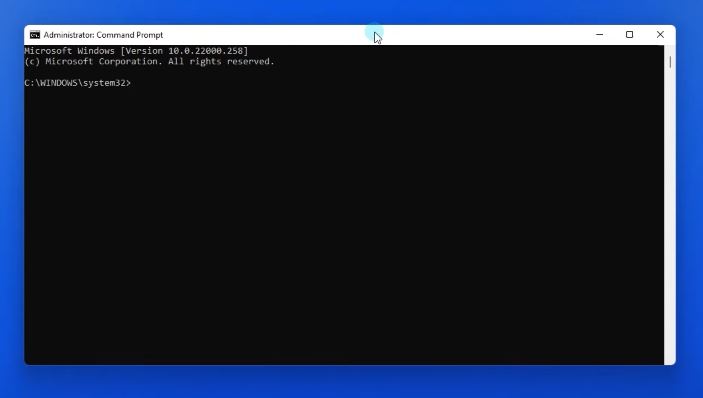
- Open Command Prompt as Administrator.
- Type:
chkdsk /f /rand hit Enter. - Restart your system to initiate the scan and repair process.
- Identify Bad Sectors
Tools like CrystalDiskInfo or HDDScan can detect early signs of hard drive failure before they escalate. - Consider Hard Drive Replacement
If persistent disk errors appear, backing up your data and switching to a solid-state drive (SSD) could improve speed and reliability.
2. Detecting and Fixing Faulty RAM
Much like a faulty fuel injector in a car, malfunctioning RAM disrupts operations and leads to random crashes, including the Kernel Data Inpage Error.
- Run Windows Memory Diagnostic
- Press Win + R, type
mdsched.exe, and hit Enter. - Select Restart now and check for problems.
- The system will scan and identify defective memory sticks.
- Press Win + R, type
- Manually Test RAM Modules
If you have multiple RAM sticks, test them one by one to isolate the faulty unit.
3. Updating or Reinstalling Drivers
Device drivers act as interpreters between hardware and software. When outdated, they create miscommunication, sometimes triggering system crashes.
- Open Device Manager (
Win + X → Device Manager). - Expand categories like Disk Drives, Storage Controllers, and Memory Devices.
- Right-click on each device and select Update driver.
- If updating doesn’t help, uninstall the driver and let Windows reinstall it upon reboot.
4. Running System File and Image Repairs
Corrupt system files can bring any computer to a grinding halt. Fortunately, Windows provides built-in tools to restore system stability.
- Run System File Checker (SFC) bashCopyEdit
sfc /scannowThis scans and repairs missing or corrupt system files. - Use DISM (Deployment Image Servicing and Management) swiftCopyEdit
DISM /Online /Cleanup-Image /RestoreHealthThis fixes deeper system image corruption issues that SFC might miss.
5. Scanning for Malware and Security Threats
In some cases, viruses or malware manipulate system files, causing errors like Kernel Data Inpage Error.
- Open Windows Security (
Win + I → Update & Security → Windows Security). - Select Virus & Threat Protection.
- Click Full Scan and let the system detect and remove potential threats.
- Use third-party tools like Malwarebytes for a more thorough scan.
6. Ensuring Hardware Connections Are Secure
Loose SATA cables, failing power connectors, or damaged external storage can lead to paging file errors.
- Power off the system and inspect hardware connections.
- Check SATA cables for wear and tear.
- Replace damaged cables to ensure uninterrupted data flow.
7. Resetting Windows as a Last Resort
If all else fails, reinstalling Windows can eliminate persistent errors.
- Go to
Settings → Update & Security → Recovery. - Click Reset this PC and follow the on-screen instructions.
- Select Keep my files to retain personal data or Remove everything for a clean slate.
In conclusion, the best solution is prevention.
Despite its catastrophic appearance, the Kernel Data Inpage Error frequently indicates more serious hardware or software problems. Fortunately, users can reduce the likelihood of running into this error by updating drivers on a regular basis, keeping an eye on the disk’s health, securing cables, and checking for malware.
You can maintain system performance and avoid unplanned blue screen crashes by using built-in Windows tools like CHKDSK, Memory Diagnostic, and SFC scans. Future operating systems might be able to anticipate and fix these issues before they cause productivity disruptions thanks to developments in AI-driven diagnostics.

4 Comments
bcesbw
Can you be more specific about the content of your article? After reading it, I still have some doubts. Hope you can help me. https://www.binance.info/sk/register?ref=WKAGBF7Y
Is léir gur fadhb thromchúiseach chórais é an Kernel Data Inpage Error, mar léiríonn sé nach bhfuil Windows in ann sonraí riachtanacha a aisghabháil ón gcomhad leathanaigh, rud a chuireann isteach go mór ar chobhsaíocht an ríomhaire.
Thanks for sharing. I read many of your blog posts, cool, your blog is very good. https://www.binance.com/join?ref=IXBIAFVY